Quick Game Mode Override

Instantly test any map with any GameMode without touching World Settings. Create reusable Mode Profiles and switch in a single click. No map saves, no accidental check-ins, no churn. Perfect for cross-platform validation and QA workflows.
You can get it here on Fab right now!

Quick Start
To override the default GameMode without modifying World Settings, from the main editor toolbar:
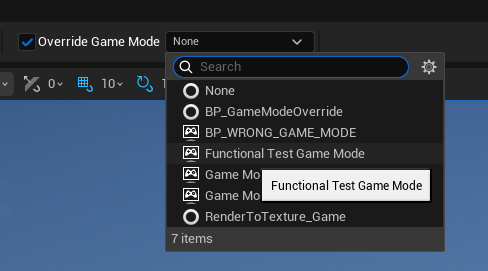
Click the “Enable Override Game Mode” checkbox
Choose a GameMode class from the dropdown next to the checkbox.
Your selection will override the game mode to all play sessions (including game builds) while leaving the map’s World Settings unchanged and free from accidental commits.
Config Files
To avoid sharing overrides across the team, add “Config\DefaultQuickGameModeOverride.ini” to source control ignore rules so each developer can keep their own local settings.
Need Help?
Feel free to reach out—we’re here to help! Just submit your request here.